Python Autoclicker
A desktop automation tool for repetitive keyboard/mouse input tasks.
Overview
I built this project because I wanted a simple way to automate repetitive mouse and keyboard actions without needing a full game or browser tool. It started as a practical experiment in desktop automation, and it grew into a little utility I could actually use.
A lot of the inspiration came from playing Roblox games with friends and family. A lot of those games are built around repetitive tasks, and I wanted a way to let the game keep running while I focused on something else. I also liked the idea of having a tool that was easy to pause, adjust, and control without much setup.
My first version was a script written in AutoIt, which worked for some simple tasks. But once I wanted more control over timing and input sequences, I switched to Python and built a more flexible version with PyAutoGUI, pynput, and Tkinter.
The end result is a lightweight desktop app that I actually use when I play games. It is something I actually wanted to use, and it gave me a chance to build a real tool around a problem I actually had.
Problem I Wanted to Solve
Repetitive clicking and timed input actions are easy to ignore at first, but they get frustrating fast. I wanted something that could handle the repetitive parts for me, while still giving me control over when it was running and when it stopped.
What I Built
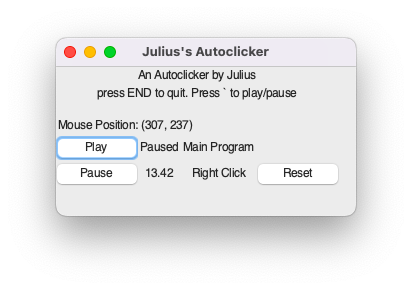
- Configurable timer-based click actions
- Play/pause controls with global hotkeys
- Mouse position display inside the GUI
- Modular row-based playback system for sequences and trigger types
- Platform-aware input handling for desktop automation
Tech Stack
Python, Tkinter, PyAutoGUI, pynput, and a modular row architecture for managing automation actions. The app is structured so different automation behaviors can be added without rewriting the main workflow.
What I Learned
This project taught me that even simple tools can get complicated fast, especially when they interact with the operating system and user input. I learned a lot about building a UI around real-world behavior, making controls feel intuitive, and keeping the app flexible as it grows.
Project Link
AI draft: this page was drafted with GPT-4 and revised by me.